Skip to content

Blog

Middle-click paste broken in Chrome on Fedora 44 Cosmic

The Problem

On Fedora 44 with the COSMIC desktop, middle-click paste does not work inside Chrome 147. Selecting text in a terminal or any other app and pasting it into Chrome with the middle mouse button did nothing.

Selecting text inside Chrome and pasting it elsewhere worked fine — so only the receiving side was broken.

Root Cause

Chrome 144+ started respecting the GTK gtk-enable-primary-paste GSettings key, which controls whether middle-click paste (PRIMARY selection) is enabled. Recent versions of gsettings-desktop-schemas ship this setting as false by default — a deliberate GNOME decision to disable middle-click paste out of the box. Chrome now obeys that preference.

Relevant upstream reports:

Fix

One command, then restart Chrome:

gsettings set org.gnome.desktop.interface gtk-enable-primary-paste true
pkill -f chrome

Verify the current value first if you want:

gsettings get org.gnome.desktop.interface gtk-enable-primary-paste

If it prints false, that is the culprit. After setting it to true and restarting, middle-click paste works normally again.

Fixing MT7615E WiFi card with missing EEPROM on Banana Pi R4

The Problem

I have a Banana Pi BPI-MT7615 802.11 ac WiFi card installed in my Banana Pi R4 running Armbian:

$ lspci
0000:00:00.0 PCI bridge: MEDIATEK Corp. MT7988 PCI Express Host Bridge [Filogic 880] (rev 01)
0000:01:00.0 Unclassified device [0002]: MEDIATEK Corp. MT7615E 802.11ac PCI Express Wireless Network Adapter

The card was recognized and the driver loaded, but there was a serious issue: TX power was stuck at 3 dBm regardless of what I tried to set:

$ sudo iw phy0 set txpower fixed 2000  # trying to set 20 dBm
$ sudo iw dev
phy#0
        Interface wlp1s0
...
                txpower 3.00 dBm    # still 3 dBm!

This made the card practically useless - 3 dBm is about 2 milliwatts, barely enough to reach the next room.

Root Cause

After some research, I found the culprit: My MT7615E card lacks an onboard EEPROM chip. The EEPROM contains calibration data including TX power limits for each channel and band. Without it, the mt76 driver falls back to minimal safe defaults - hence the 3 dBm limit.

This is a known issue with certain MT7615E development boards and cheap cards. The relevant discussions:

The Solution

The fix requires two components:

  1. A kernel patch that allows the mt76 driver to load EEPROM data from a file
  2. An appropriate EEPROM binary file with proper calibration data

Kernel Patch

Frank Wunderlich created a patch for the BPI-Router-Linux kernel that adds filesystem-based EEPROM loading. The original patch is available at Frank-W's BPI-Router-Linux repository.

I adapted this patch for the Armbian build system targeting kernel 6.16. The patch adds a mt76_get_eeprom_file() function that looks for EEPROM data at /lib/firmware/mediatek/{driver}_rf.bin. For MT7615E, this means /lib/firmware/mediatek/mt7615e_rf.bin.

The patch is available in my Armbian fork: tmshlvck/armbian-build bpir4 branch

Specifically:

EEPROM Binary File

You need a working EEPROM image for your card. I'm providing the one that works for my MT7615E card with unlocked power limits:

Download: mt7615e_rf.bin (19880 bytes)

Alternative sources for EEPROM files:

Installation

1. Build Armbian with the patch

Clone my Armbian fork and build:

git clone -b bpir4 https://github.com/tmshlvck/armbian-build.git
cd armbian-build
./compile.sh BOARD=bananapi-r4 BRANCH=edge kernel

Or apply the patch manually to your own Armbian build.

2. Install the EEPROM file

Copy the EEPROM binary to the target system:

sudo mkdir -p /lib/firmware/mediatek/
sudo cp mt7615e_rf.bin /lib/firmware/mediatek/

3. Reboot and verify

After rebooting, check dmesg for successful EEPROM loading:

dmesg | grep -i eeprom

You should see something like:

mt7615e 0000:01:00.0: Load eeprom: /lib/firmware/mediatek/mt7615e_rf.bin
mt7615e 0000:01:00.0: Load eeprom OK, count 19880 byte

Now verify TX power can be set properly:

sudo iw phy0 set txpower fixed 2000  # 20 dBm
sudo iw dev

The interface should now show the requested TX power (within regulatory limits).

Technical Details

The patch works by modifying drivers/net/wireless/mediatek/mt76/eeprom.c to try loading EEPROM from filesystem before falling back to device tree or NVMEM sources. The file path is constructed as /lib/firmware/mediatek/{driver_name}_rf.bin, where driver_name comes from the kernel driver (e.g., mt7615e, mt7915e, etc.).

This approach was proposed upstream but wasn't merged as OpenWRT prefers device tree based solutions. However, for development boards and cards without factory-programmed EEPROM, the filesystem approach is practical and flexible.

Important Notes

  • Different EEPROM files may have different regulatory domain settings affecting available channels and power levels
  • The EEPROM contains calibration data specific to the hardware - using wrong data could result in suboptimal performance or regulatory violations
  • This patch is not upstream in mainline Linux or Armbian; you'll need to maintain it yourself or use my fork

References

Prefix Delegation broken with systemd-network and UPC/Sunrise(CH)-supplied Arris modem

IPv6 home network

Networking is not a fun anymore, they said. Noone wants to do networking, they said.

Well, yes, IPv4 is obsolete and dull even without the great evil of all times - NAT. But I am using IPv6 for fun and profit for years now, so everything is fine, right? Nope. IPv6 is stil a second class citizen for most of the ISPs. Many software developers hardly understand the basics of networking and they make the apps working empirically and iteratively. IPv6 is left broken in many cases because there is still supposed to be a fallback to IPv4 - "happy eyeballs".

And yes, v6 is indeed more complex in certain aspects.

Look at the prefix delegation: Is it necessary to run large access network? No, in most cases. Does it promise more flexibility than static routes? Sure. And everybody is using it! Just join the bandwagon...

Funny modem

That brings me to THE MODEM. I got it from UPC/Sunrise few years ago when I got the service in the suburbs of Zurich. It is in fact a heavily locked-down and branded version of Arris TG3492LG-LC.
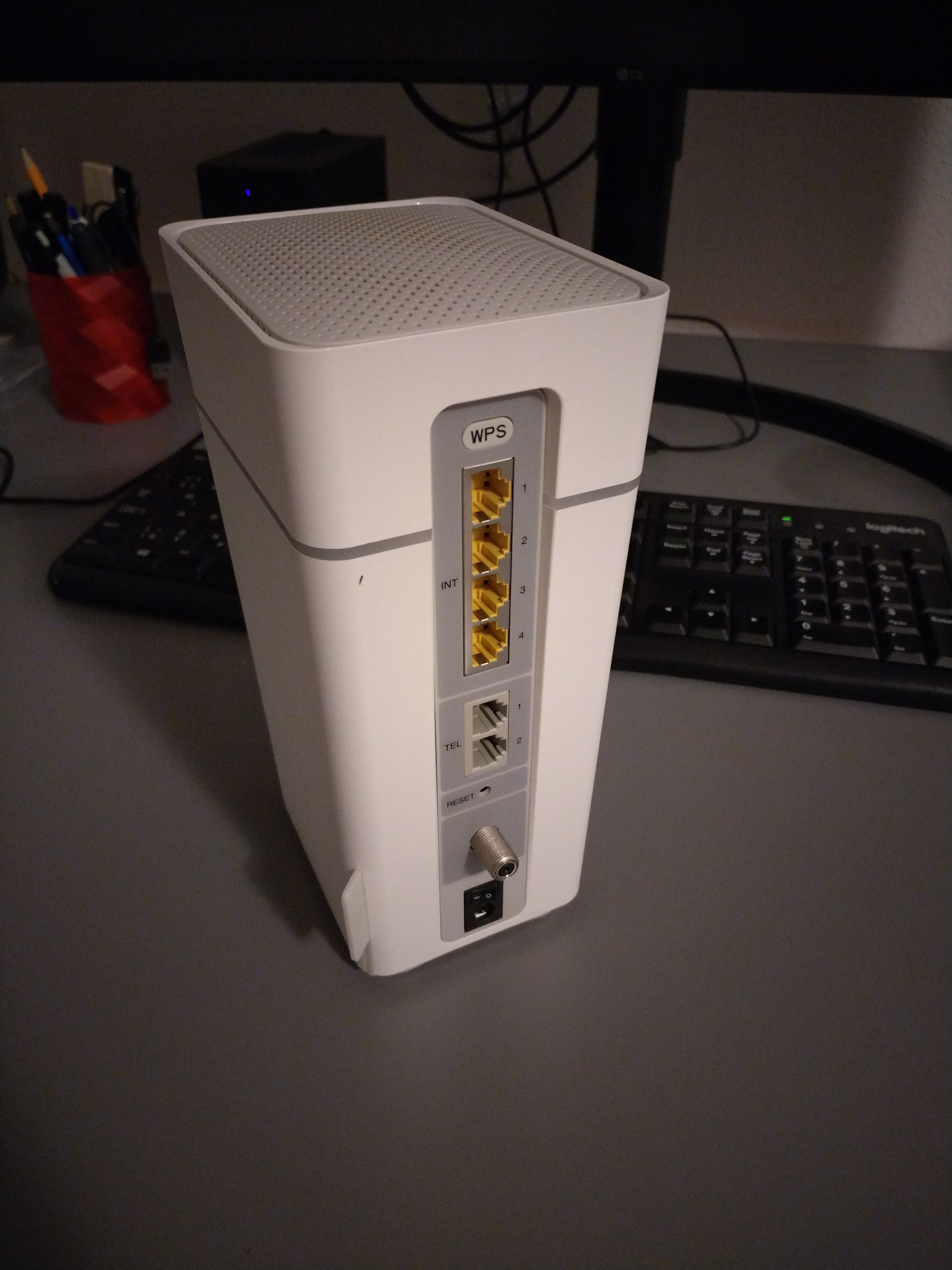
Modem Arris TG3492LG-LC

PD going wrong with systemd-networkd

On the receiving end is just a current Debian stable (bookworm) running on Turris Omnia (armhf) board. Nothing fancy. I configured systemd-networkd with the following /etc/systemd/network/end2.network:

[Match]
Name=end2

[Network]
KeepConfiguration=yes
Address=192.168.1.2/24
Gateway=192.168.1.1
LinkLocalAddressing=ipv6
IPv6AcceptRA=yes
ConfigureWithoutCarrier=true

[IPv6AcceptRA]
DHCPv6Client=always

[DHCPv6]
PrefixDelegationHint=::/60

And I had corresponding config so I can use the delegated prefix on br0:

[Match]
Name=br0

[Network]
ConfigureWithoutCarrier=yes
LinkLocalAddressing=ipv6
Address=192.168.8.1/24
DHCPPrefixDelegation=yes
IPv6SendRA=yes
IPv6AcceptRA=no

[DHCPPrefixDelegation]
UplinkInterface=end2
SubnetId=0x0
Announce=yes

[IPv6SendRA]
EmitDNS=yes
DNS=2606:4700:4700::1111
DNS=2001:4860:4860::8888

Which worked to a certain extent. Sometimes (say that 1 in 2 or 3 tries succeeded so I got the delegated prefix on br0). But astonishingly I was also randomly loosing the delegated prefix within 5-15 minutes after I obtained it. So I configured systemd-networkd debugging in /etc/systemd/system/systemd-networkd.service.d/10-debug.conf :

[Service]
Environment=SYSTEMD_LOG_LEVEL=debug

systemd-networkd debug

Two observations in the log:

1) the T1 and T2 for the delegated prefix are unusually short (5 and 10 seconds).

2) It seems that the lost delegation is caused by a malformed message sent by the modem when the systemd-networkd misses the T2 renew deadline and has to rebind the PD instead (see Feb 09 11:30:23).

Feb 09 11:29:05 slepice systemd-networkd[12922]: end2: Requesting NDisc route (configuring,configured): dst: 2a02:aa11:380:300::/57, src: n/a, gw: fe80::aef8:ccff:fe64:3975, prefsrc: n/a, scope: global, table: main(254), proto: ra, type: unicast, nexthop: 0, priority: 1024, flags: n/a
Feb 09 11:29:05 slepice systemd-networkd[12922]: end2: Route prefix is ::/0, ignoring
Feb 09 11:29:05 slepice systemd-networkd[12922]: end2: Setting SLAAC addresses and router.
Feb 09 11:29:05 slepice systemd-networkd[12922]: end2: DHCPv6 client: Timeout T1
Feb 09 11:29:05 slepice systemd-networkd[12922]: end2: DHCPv6 client: State changed: bound -> renew
Feb 09 11:29:05 slepice systemd-networkd[12922]: end2: Configuring NDisc route (requesting,configuring,configured): dst: n/a, src: n/a, gw: fe80::aef8:ccff:fe64:3975, prefsrc: n/a, scope: global, table: main(254), proto: ra, type: unicast, nexthop: 0, priority: 1024, flags: n/a
Feb 09 11:29:05 slepice systemd-networkd[12922]: end2: Configuring NDisc route (requesting,configuring,configured): dst: 2a02:aa11:380:300::/64, src: n/a, gw: n/a, prefsrc: n/a, scope: global, table: main(254), proto: ra, type: unicast, nexthop: 0, priority: 1024, flags: n/a
Feb 09 11:29:05 slepice systemd-networkd[12922]: end2: Configuring NDisc address (requesting,configured): 2a02:aa11:380:300:da58:d7ff:fe00:19f3/64 (valid for 1w 4d 11h 52min 40s, preferred for 4d 11h 52min 40s), flags: manage-temporary-address,no-prefixroute, scope: global
Feb 09 11:29:05 slepice systemd-networkd[12922]: end2: Configuring NDisc route (requesting,configuring,configured): dst: 2a02:aa11:380:300::/57, src: n/a, gw: fe80::aef8:ccff:fe64:3975, prefsrc: n/a, scope: global, table: main(254), proto: ra, type: unicast, nexthop: 0, priority: 1024, flags: n/a
Feb 09 11:29:05 slepice systemd-networkd[12922]: end2: DHCPv6 client: Sent Renew
Feb 09 11:29:05 slepice systemd-networkd[12922]: end2: DHCPv6 client: Next retransmission in 9s
Feb 09 11:29:05 slepice systemd-networkd[12922]: end2: ndisc_check_ready(): SLAAC addresses and routes are not set.
Feb 09 11:29:05 slepice systemd-networkd[12922]: end2: Received updated NDisc address (configured): 2a02:aa11:380:300:da58:d7ff:fe00:19f3/64 (valid for 1w 4d 11h 52min 40s, preferred for 4d 11h 52min 40s), flags: manage-temporary-address,no-prefixroute, scope: global
Feb 09 11:29:05 slepice systemd-networkd[12922]: end2: ndisc_check_ready(): SLAAC addresses and routes are not set.
Feb 09 11:29:05 slepice systemd-networkd[12922]: end2: SLAAC addresses and routes set.
Feb 09 11:29:05 slepice systemd-networkd[12922]: end2: DHCPv6 client: Processed Reply message
Feb 09 11:29:05 slepice systemd-networkd[12922]: end2: DHCPv6 client: T1 expires in 4s
Feb 09 11:29:05 slepice systemd-networkd[12922]: end2: DHCPv6 client: T2 expires in 9s
Feb 09 11:29:05 slepice systemd-networkd[12922]: end2: DHCPv6 client: Valid lifetime expires in 3h
Feb 09 11:29:05 slepice systemd-networkd[12922]: end2: DHCPv6 client: State changed: renew -> bound
...
Feb 09 11:30:23 slepice systemd-networkd[12922]: end2: DHCPv6 client: Timeout T1
Feb 09 11:30:23 slepice systemd-networkd[12922]: end2: DHCPv6 client: State changed: bound -> renew
Feb 09 11:30:23 slepice systemd-networkd[12922]: end2: DHCPv6 client: Timeout T2
Feb 09 11:30:23 slepice systemd-networkd[12922]: end2: DHCPv6 client: State changed: renew -> rebind
Feb 09 11:30:23 slepice systemd-networkd[12922]: end2: DHCPv6 client: Sent Rebind
Feb 09 11:30:23 slepice systemd-networkd[12922]: end2: DHCPv6 client: Next retransmission in 9s
Feb 09 11:30:23 slepice systemd-networkd[12922]: end2: DHCPv6 client: Received an IA option without valid IA addresses or PD prefixes, ignoring.
Feb 09 11:30:23 slepice systemd-networkd[12922]: end2: DHCPv6 client: Failed to parse IA_PD option, ignoring: No data available
Feb 09 11:30:23 slepice systemd-networkd[12922]: end2: DHCPv6 client: Processed Reply message
Feb 09 11:30:23 slepice systemd-networkd[12922]: end2: DHCPv6 client: T1 expires in 2d 3h 25min 40s
Feb 09 11:30:23 slepice systemd-networkd[12922]: end2: DHCPv6 client: T2 expires in 3d 6h 17min 36s
Feb 09 11:30:23 slepice systemd-networkd[12922]: end2: DHCPv6 client: Valid lifetime expires in 4d 11h 52min 41s
Feb 09 11:30:23 slepice systemd-networkd[12922]: end2: DHCPv6 client: State changed: rebind -> bound
Feb 09 11:30:23 slepice systemd-networkd[12922]: end2: DHCPv6 address 2a02:aa11:380:300::d6f1/128 (valid for 4d 11h 52min 40s, preferred for 4d 11h 52min 40s)
Feb 09 11:30:23 slepice systemd-networkd[12922]: end2: Requesting DHCPv6 address (configured): 2a02:aa11:380:300::d6f1/128 (valid for 4d 11h 52min 40s, preferred for 4d 11h 52min 40s), flags: no-prefixroute, scope: global
Feb 09 11:30:23 slepice systemd-networkd[12922]: br0: Removing DHCP-PD address (configured): 2a02:aa11:380:310:ac58:60ff:fe6b:cd2e/64 (valid for 2h 59min 50s, preferred for 1h 59min 50s), flags: manage-temporary-address, scope: global
Feb 09 11:30:23 slepice systemd-networkd[12922]: Sent message type=signal sender=n/a destination=n/a path=/org/freedesktop/network1/link/_310 interface=org.freedesktop.DBus.Properties member=PropertiesChanged cookie=79 reply_cookie=0 signature=sa{sv}as error-name=n/a error-message=n/a
Feb 09 11:30:23 slepice systemd-networkd[12922]: Removing DHCPv6 route (configuring,configured): dst: 2a02:aa11:380:310::/60, src: n/a, gw: n/a, prefsrc: n/a, scope: global, table: main(254), proto: dhcp, type: unreachable, nexthop: 0, priority: 1024, flags: n/a
Feb 09 11:30:23 slepice systemd-networkd[12922]: end2: Setting DHCPv6 addresses and routes
Feb 09 11:30:23 slepice systemd-networkd[12922]: end2: Configuring DHCPv6 address (requesting,configured): 2a02:aa11:380:300::d6f1/128 (valid for 4d 11h 52min 40s, preferred for 4d 11h 52min 40s), flags: no-prefixroute, scope: global
Feb 09 11:30:23 slepice systemd-networkd[12922]: br0: Forgetting DHCP-PD address (n/a): 2a02:aa11:380:310:ac58:60ff:fe6b:cd2e/64 (valid for 2h 59min 49s, preferred for 1h 59min 49s), flags: manage-temporary-address, scope: global
Feb 09 11:30:23 slepice systemd-networkd[12922]: br0: Forgetting foreign route (n/a): dst: 2a02:aa11:380:310::/128, src: n/a, gw: n/a, prefsrc: n/a, scope: global, table: local(255), proto: kernel, type: anycast, nexthop: 0, priority: 0, flags: n/a
Feb 09 11:30:23 slepice systemd-networkd[12922]: br0: Forgetting foreign route (n/a): dst: 2a02:aa11:380:310:ac58:60ff:fe6b:cd2e/128, src: n/a, gw: n/a, prefsrc: n/a, scope: global, table: local(255), proto: kernel, type: local, nexthop: 0, priority: 0, flags: n/a
Feb 09 11:30:23 slepice systemd-networkd[12922]: Removed DHCPv6 route (configuring): dst: 2a02:aa11:380:310::/60, src: n/a, gw: n/a, prefsrc: n/a, scope: global, table: main(254), proto: dhcp, type: unreachable, nexthop: 0, priority: 1024, flags: n/a
Feb 09 11:30:23 slepice systemd-networkd[12922]: end2: Received updated DHCPv6 address (configured): 2a02:aa11:380:300::d6f1/128 (valid for 4d 11h 52min 40s, preferred for 4d 11h 52min 40s), flags: no-prefixroute, scope: global
Feb 09 11:30:23 slepice systemd-networkd[12922]: end2: DHCPv6 addresses and routes set.
Feb 09 11:30:23 slepice systemd-networkd[12922]: end2: NDISC: Received Router Advertisement: flags OTHER preference medium lifetime 1800 sec
Feb 09 11:30:23 slepice systemd-networkd[12922]: end2: NDISC: Invoking callback for 'router' event.
Feb 09 11:30:23 slepice systemd-networkd[12922]: end2: Acquiring DHCPv6 lease on NDisc request
Feb 09 11:30:23 slepice systemd-networkd[12922]: end2: Requesting NDisc route (configuring,configured): dst: n/a, src: n/a, gw: fe80::aef8:ccff:fe64:3975, prefsrc: n/a, scope: global, table: main(254), proto: ra, type: unicast, nexthop: 0, priority: 1024, flags: n/a
Feb 09 11:30:23 slepice systemd-networkd[12922]: end2: Requesting NDisc route (configuring,configured): dst: 2a02:aa11:380:300::/64, src: n/a, gw: n/a, prefsrc: n/a, scope: global, table: main(254), proto: ra, type: unicast, nexthop: 0, priority: 1024, flags: n/a
Feb 09 11:30:23 slepice systemd-networkd[12922]: end2: Requesting NDisc address (configured): 2a02:aa11:380:300:da58:d7ff:fe00:19f3/64 (valid for 1w 4d 11h 52min 40s, preferred for 4d 11h 52min 40s), flags: manage-temporary-address,no-prefixroute, scope: global
Feb 09 11:30:23 slepice systemd-networkd[12922]: end2: Requesting NDisc route (configuring,configured): dst: 2a02:aa11:380:300::/57, src: n/a, gw: fe80::aef8:ccff:fe64:3975, prefsrc: n/a, scope: global, table: main(254), proto: ra, type: unicast, nexthop: 0, priority: 1024, flags: n/a
Feb 09 11:30:23 slepice systemd-networkd[12922]: end2: Route prefix is ::/0, ignoring
Feb 09 11:30:23 slepice systemd-networkd[12922]: end2: Setting SLAAC addresses and router.
Feb 09 11:30:23 slepice systemd-networkd[12922]: end2: Configuring NDisc route (requesting,configuring,configured): dst: n/a, src: n/a, gw: fe80::aef8:ccff:fe64:3975, prefsrc: n/a, scope: global, table: main(254), proto: ra, type: unicast, nexthop: 0, priority: 1024, flags: n/a
Feb 09 11:30:23 slepice systemd-networkd[12922]: end2: Configuring NDisc route (requesting,configuring,configured): dst: 2a02:aa11:380:300::/64, src: n/a, gw: n/a, prefsrc: n/a, scope: global, table: main(254), proto: ra, type: unicast, nexthop: 0, priority: 1024, flags: n/a
Feb 09 11:30:23 slepice systemd-networkd[12922]: end2: Configuring NDisc address (requesting,configured): 2a02:aa11:380:300:da58:d7ff:fe00:19f3/64 (valid for 1w 4d 11h 52min 40s, preferred for 4d 11h 52min 40s), flags: manage-temporary-address,no-prefixroute, scope: global
Feb 09 11:30:23 slepice systemd-networkd[12922]: end2: Configuring NDisc route (requesting,configuring,configured): dst: 2a02:aa11:380:300::/57, src: n/a, gw: fe80::aef8:ccff:fe64:3975, prefsrc: n/a, scope: global, table: main(254), proto: ra, type: unicast, nexthop: 0, priority: 1024, flags: n/a
Feb 09 11:30:23 slepice systemd-networkd[12922]: end2: ndisc_check_ready(): SLAAC addresses and routes are not set.
Feb 09 11:30:23 slepice systemd-networkd[12922]: end2: Received updated NDisc address (configured): 2a02:aa11:380:300:da58:d7ff:fe00:19f3/64 (valid for 1w 4d 11h 52min 40s, preferred for 4d 11h 52min 40s), flags: manage-temporary-address,no-prefixroute, scope: global
Feb 09 11:30:23 slepice systemd-networkd[12922]: end2: ndisc_check_ready(): SLAAC addresses and routes are not set.
Feb 09 11:30:23 slepice systemd-networkd[12922]: end2: SLAAC addresses and routes set.

tcpdump

Indeed, the conclusions from the logs were right. We can see the rebind failing with T1:0 T2:0 and no prefix. Funny part is that it succeeded several times before it failed:

root@slepice:/home/th# tcpdump -i end2 -n ip6 and udp port 546 or udp port 547 -vvv
...
11:30:01.879154 IP6 (flowlabel 0x1639f, hlim 64, next-header UDP (17) payload length: 257) fe80::aef8:ccff:fe64:3975.547 > fe80::da58:d7ff:fe00:19f3.546: [udp sum ok] dhcp6 reply (xid=452c27 (IA_NA IAID:2885014782 T1:194180 T2:310688 (IA_ADDR 2a02:aa11:380:300::d6f1 pltime:388361 vltime:388361) (status-code Success)) (IA_PD IAID:2885014782 T1:5 T2:10 (IA_PD-prefix 2a02:aa11:380:310::/60 pltime:7200 vltime:10800) (status-code Success)) (server-ID hwaddr/time type 1 time 684092944 acf8cc643975) (client-ID vid 0000ab110ccd5bd4) (preference 255) (DNS-server 2001:730:3e82::12 2001:730:3e82::13))
11:30:07.881235 IP6 (flowlabel 0x3dcd2, hlim 1, next-header UDP (17) payload length: 166) fe80::da58:d7ff:fe00:19f3.546 > ff02::1:2.547: [bad udp cksum 0xc88a -> 0x3c2b!] dhcp6 renew (xid=2db0ca (server-ID hwaddr/time type 1 time 684092944 acf8cc643975) (IA_NA IAID:2885014782 T1:0 T2:0 (IA_ADDR 2a02:aa11:380:300::d6f1 pltime:0 vltime:0)) (IA_PD IAID:2885014782 T1:0 T2:0 (IA_PD-prefix 2a02:aa11:380:310::/60 pltime:0 vltime:0)) (Client-FQDN) (option-request DNS-server SNTP-servers NTP-server) (client-ID vid 0000ab110ccd5bd4) (elapsed-time 0))
11:30:07.883520 IP6 (flowlabel 0x1639f, hlim 64, next-header UDP (17) payload length: 257) fe80::aef8:ccff:fe64:3975.547 > fe80::da58:d7ff:fe00:19f3.546: [udp sum ok] dhcp6 reply (xid=2db0ca (IA_NA IAID:2885014782 T1:194180 T2:310688 (IA_ADDR 2a02:aa11:380:300::d6f1 pltime:388361 vltime:388361) (status-code Success)) (IA_PD IAID:2885014782 T1:5 T2:10 (IA_PD-prefix 2a02:aa11:380:310::/60 pltime:7200 vltime:10800) (status-code Success)) (server-ID hwaddr/time type 1 time 684092944 acf8cc643975) (client-ID vid 0000ab110ccd5bd4) (preference 255) (DNS-server 2001:730:3e82::12 2001:730:3e82::13))
11:30:13.653915 IP6 (flowlabel 0x3dcd2, hlim 1, next-header UDP (17) payload length: 166) fe80::da58:d7ff:fe00:19f3.546 > ff02::1:2.547: [bad udp cksum 0xc88a -> 0xb262!] dhcp6 renew (xid=b03a10 (server-ID hwaddr/time type 1 time 684092944 acf8cc643975) (IA_NA IAID:2885014782 T1:0 T2:0 (IA_ADDR 2a02:aa11:380:300::d6f1 pltime:0 vltime:0)) (IA_PD IAID:2885014782 T1:0 T2:0 (IA_PD-prefix 2a02:aa11:380:310::/60 pltime:0 vltime:0)) (Client-FQDN) (option-request DNS-server SNTP-servers NTP-server) (client-ID vid 0000ab110ccd5bd4) (elapsed-time 0))
11:30:13.658293 IP6 (flowlabel 0x1639f, hlim 64, next-header UDP (17) payload length: 257) fe80::aef8:ccff:fe64:3975.547 > fe80::da58:d7ff:fe00:19f3.546: [udp sum ok] dhcp6 reply (xid=b03a10 (IA_NA IAID:2885014782 T1:194180 T2:310688 (IA_ADDR 2a02:aa11:380:300::d6f1 pltime:388361 vltime:388361) (status-code Success)) (IA_PD IAID:2885014782 T1:5 T2:10 (IA_PD-prefix 2a02:aa11:380:310::/60 pltime:7200 vltime:10800) (status-code Success)) (server-ID hwaddr/time type 1 time 684092944 acf8cc643975) (client-ID vid 0000ab110ccd5bd4) (preference 255) (DNS-server 2001:730:3e82::12 2001:730:3e82::13))
11:30:23.655773 IP6 (flowlabel 0x3dcd2, hlim 1, next-header UDP (17) payload length: 148) fe80::da58:d7ff:fe00:19f3.546 > ff02::1:2.547: [bad udp cksum 0xc878 -> 0x6651!] dhcp6 rebind (xid=92cf1e (IA_NA IAID:2885014782 T1:0 T2:0 (IA_ADDR 2a02:aa11:380:300::d6f1 pltime:0 vltime:0)) (IA_PD IAID:2885014782 T1:0 T2:0 (IA_PD-prefix 2a02:aa11:380:310::/60 pltime:0 vltime:0)) (Client-FQDN) (option-request DNS-server SNTP-servers NTP-server) (client-ID vid 0000ab110ccd5bd4) (elapsed-time 0))
11:30:23.658037 IP6 (flowlabel 0x1639f, hlim 64, next-header UDP (17) payload length: 182) fe80::aef8:ccff:fe64:3975.547 > fe80::da58:d7ff:fe00:19f3.546: [udp sum ok] dhcp6 reply (xid=92cf1e (IA_NA IAID:2885014782 T1:194180 T2:310688 (IA_ADDR 2a02:aa11:380:300::d6f1 pltime:388361 vltime:388361) (status-code Success)) (IA_PD IAID:2885014782 T1:0 T2:0) (server-ID hwaddr/time type 1 time 684092944 acf8cc643975) (client-ID vid 0000ab110ccd5bd4) (preference 255) (DNS-server 2001:730:3e82::12 2001:730:3e82::13))

What/who is wrong then?

Even though I read the relevant RFCs I am not sure where the problem really is.

  • I believe that the modem sets insane T1:5 T2:10. WDYT @sunrise.ch ? :-)
  • I believe that the modem should stay consistent and the rebind should succeed.
  • I think that systemd-networkd shoud re-try to re-acquire the PD when it fails to get it. However it seems that at least with systemd 252 it is not the case. I digged into current git master (257.3+) and I do not think that it has changed. This remains TODO to test and understand.
  • Interestingly, PD is stable with wide-dhcpv6-client and it seems that the router sends a bit longer T1 (like 17) as well as T2 and there are only renews and no rebinds (even after few hours running). But why? RFC says that DHCPv6 server must disregard any T1 nd T2 values in the requests and that the client should set them to 0, which is what both systemd-networkd and wide-dhcpv6-client do.

Long story short: I feel so lonely. Sunrise must have shipped thousands maybe even tens of thousands of those modems. Am I the first one who tried this?

TBH I do not know if the T1 and T2 values are pushed to the modem from the DOCSIS network config or if there is an upper level DHCPv6 PD or where the decission about the T1 and T2 values actually takes place. So could it be just a small misconfigured partition of the access network?
MAAS regiond ignores new NICs, what now?

Long story short

I have an old MAAS regiond+rackd (the whole thing) installed from snap and updated over time to the fairly recent stable/3.4 channel that now corresponds to the version 3.4.2.

I noticed that new NICs added to the VM, which runs the MAAS, never appear in the MAAS controllers -> Interfaces page. But I need it in order to connect MAAS to the new VLANs we just deployed.

First clue comes from logs. The /var/snap/maas/common/log/rackd.log contains these errors:

2024-05-09 12:00:14 twisted.internet.defer: [critical] Unhandled error in Deferred:
2024-05-09 12:00:14 twisted.internet.defer: [critical] 
    Traceback (most recent call last):
    Failure: twisted.internet.error.MulticastJoinError: (b'\xe0\x00\x00v', b'\n\x0c\n\xf8', 98, 'Address already in use')

2024-05-09 12:00:14 twisted.internet.defer: [critical] Unhandled error in Deferred:
2024-05-09 12:00:14 twisted.internet.defer: [critical] 
    Traceback (most recent call last):
    Failure: twisted.internet.error.MulticastJoinError: (b'\xe0\x00\x00v', b'\n\x0c\x07\xf8', 98, 'Address already in use')

2024-05-09 12:00:14 twisted.internet.defer: [critical] Unhandled error in Deferred:
2024-05-09 12:00:14 twisted.internet.defer: [critical] 
    Traceback (most recent call last):
    Failure: twisted.internet.error.MulticastJoinError: (b'\xe0\x00\x00v', b'\n\x0c\x13\xfa', 98, 'Address already in use')

2024-05-09 12:00:14 provisioningserver.rpc.clusterservice: [info] Rack controller 'rsryyc' registered (via sf-maasregion-1:pid=2275) with MAAS version 3.4.2-14353-g.5a5221d57.
2024-05-09 12:00:20 provisioningserver.utils.services: [warn] Couldn't report test results: HTTP error [500]

Even though there are multiple open bug reports that deal with the twisted.internet.error.MulticastJoinError I believe it is not the source of the issues here.

The true problem is the line Couldn't report test results: HTTP error [500].

The complementary part on regiond from /var/snap/maas/common/log/regiond.log:

2024-05-09 12:01:20 maasserver: [error] ################################ Exception: Status for scriptresult 5462 is not running or pending (2) ################################
2024-05-09 12:01:20 maasserver: [error] Traceback (most recent call last):
  File "/snap/maas/35359/usr/lib/python3/dist-packages/django/core/handlers/base.py", line 181, in _get_response
    response = wrapped_callback(request, *callback_args, **callback_kwargs)
  File "/snap/maas/35359/lib/python3.10/site-packages/maasserver/utils/views.py", line 298, in view_atomic_with_post_commit_savepoint
    return view_atomic(*args, **kwargs)
  File "/usr/lib/python3.10/contextlib.py", line 79, in inner
    return func(*args, **kwds)
  File "/snap/maas/35359/lib/python3.10/site-packages/maasserver/api/support.py", line 62, in __call__
    response = super().__call__(request, *args, **kwargs)
  File "/snap/maas/35359/usr/lib/python3/dist-packages/django/views/decorators/vary.py", line 20, in inner_func
    response = func(*args, **kwargs)
  File "/snap/maas/35359/usr/lib/python3.10/dist-packages/piston3/resource.py", line 197, in __call__
    result = self.error_handler(e, request, meth, em_format)
  File "/snap/maas/35359/usr/lib/python3.10/dist-packages/piston3/resource.py", line 195, in __call__
    result = meth(request, *args, **kwargs)
  File "/snap/maas/35359/lib/python3.10/site-packages/maasserver/api/support.py", line 371, in dispatch
    return function(self, request, *args, **kwargs)
  File "/snap/maas/35359/lib/python3.10/site-packages/metadataserver/api.py", line 858, in signal
    target_status = process(node, request, status)
  File "/snap/maas/35359/lib/python3.10/site-packages/metadataserver/api.py", line 680, in _process_commissioning
    self._store_results(
  File "/snap/maas/35359/lib/python3.10/site-packages/metadataserver/api.py", line 563, in _store_results
    script_result.store_result(
  File "/snap/maas/35359/lib/python3.10/site-packages/maasserver/models/scriptresult.py", line 270, in store_result
    self.status in SCRIPT_STATUS_RUNNING_OR_PENDING
AssertionError: Status for scriptresult 5462 is not running or pending (2)

Fix

I tracked the error to this line. But this assert should have never been reached because it is in the block started by:

    if self.script_set.node.is_commissioning():

So the status of the Node object in DB for the rackd has wrong status. And indeed:

$ sudo snap run --shell maas -c 'maas-region shell'
>>> from maasserver.models import *
>>> Node.objects.get(hostname="sf-maasregion-1").status
>>> 0

0 = New, so I am setting 6 for Deployed.

>>> n=Node.objects.get(hostname="sf-maasregion-1")
>>> n.status = 6
>>> n.save()
Ctrl-D

$ sudo systemctl restart snap.maas.supervisor.service

And that did the trick.

Migrating blog from blogger.com to mkdocs and GitHub pages

Why?

Simple. The management web interface was a bit painful in the beginning and it is even more so in 2024. It was simply time to move to something like Git, static page generator and CI/CD for deployment.

How

I found this great blogpost Daniel Roy Greenfeld - Blogger to Markdown Script . By using the script and the described method it was easy to convert old posts from blogger.com to MD. Though the images need manual download and linking to the primary source. Or I may try to find the originals to see if they are better quality. But this remains TODO for now.

Then I just created quick GitHub actions to deploy the blog based on this article Material for MkDocs - Publishing your site.

The only downside is that the web URL is bound to be <username>.github.io/<reponame> but I guess it is a sensible simplification.

FortiGate PBR needs active route - really?

This was originally posted on blogger here.

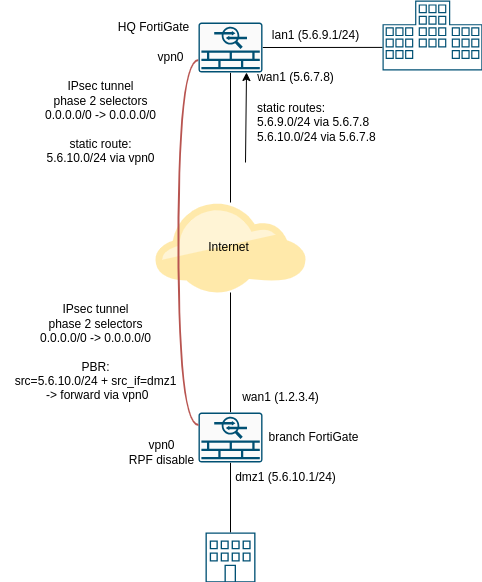
Imagine you have a classic IPsec tunnel between HQ and branch with a slight twist: Say you want to distribute some portion of the address space that is assigned to HQ over the tunnel to the branch and use the IPs in branch DMZ.

The picture shows the routes - HQ has 5.6.7.8 address on wan1 and there are two static routes from the ISP:

  • 5.6.9.0/24 via 5.6.7.8 (use in HQ LAN)
  • 5.6.10.0/24 via 5.6.7.8 (use in branch DMZ)

FortiGate PBR Diagram

So we set up a VPN tunnel, set static routes on HQ side, set IPs and then we need PBR to make sure that despite the default route going over wan1 on branch side to the ISP, the traffic from 5.6.10.0/24 to anywhere is routed over the tunnel back to HQ. Why? Well, the branch ISP applies RPF. Everybody is supposed to apply RPF, because it is the best practice... or something (*). (https://www.rfc-editor.org/info/bcp38)

Anyway, the problem is that PBR on its own is apparently not enough. If you just set it up, it does not work. Since it has not been immediately apparent why to be I tried to google questions like "FortiGate PBR not working" and I eventually found one "solution" but no real answer what is going on here. To me specific, last comment here gives instructions that seems to work:

Add a new default route to routing table. The route needs to have same Administrative Distance as the active default route (towards ISP), next-hop is not needed, but the interface is vpn0 and the Priority has to be lower (= higher number) than the real active default route towards the ISP.

OK, it works, but why? The official manual nor this is not really helpful and I found few other speculations on Reddit, Stack Overflow and random blogs, but nothing on the sport. So, the answer is...

RPF.

There is reverse path filtering on the tunnel interface and FortiGates use "feasible path" RPF rule by default, which means that with an active default route through the tunnel is enough to provide feasible path, even though the route is de-prioritized (to avoid causing random load-balancing that would very likely lead to random asymmetric routing and therefore random packetloss in this setting). Btw. the AD has to be same as the real static route, otherwise it will not be considered as a feasible path.

And another possibility is disabling the RPF with "src-check disable", like this:

branch # config system interface

branch (interface) # edit vpn0

branch (vpn0) # show
config system interface
    edit "vpn0"
        set vdom "root"
        set allowaccess ping
        set type tunnel
        set src-check disable
        set snmp-index 19
        config ipv6
            set ip6-allowaccess ping
        end
        set interface "wan"
    next
end

(*) On more serious note - mocking BCP 38 is not fair. It is undoubtedly the best community-based and therefore Internet-native solution to great portion of the known cyber-attacks.

SSH is going ape due to ed25519 host keys

This was originally posted on blogger here.

I started seeing the complaints from SSH clients about the unknown host keys from various servers that are perfectly stable and secure few months ago. I didn't have time to fully analyze it but I suspected that it is partially caused by me running cutting-edge Debain Unstable and/or Ubuntu 22.04 (before the release).

The low-level cause is that "something" has changed (and as I said, I am not exactly sure what is going on here) that caused that the servers or clients prefer new ssh-ed25519 instead of the old ecdsa-sha2-nistp256. Which is a good thing, only that the client keeps saying something like this:

@@@@@@@@@@@@@@@@@@@@@@@@@@@@@@@@@@@@@@@@@@@@@@@@@@@@@@@@@@@
@    WARNING: REMOTE HOST IDENTIFICATION HAS CHANGED!     @
@@@@@@@@@@@@@@@@@@@@@@@@@@@@@@@@@@@@@@@@@@@@@@@@@@@@@@@@@@@
IT IS POSSIBLE THAT SOMEONE IS DOING SOMETHING NASTY!
Someone could be eavesdropping on you right now (man-in-the-middle attack)!
It is also possible that a host key has just been changed.
The fingerprint for the RSA key sent by the remote host is
.
Please contact your system administrator.
Add correct host key in /.ssh/known_hosts to get rid of this message.
Offending RSA key in /.ssh/known_hosts:
  remove with:
  ssh-keygen -f "/.ssh/known_hosts" -R ""
RSA host key for  has changed and you have requested strict checking.
Host key verification failed.

Which is a serious warning that should not be ignored in any case, unless one positively knows that the server had good reason for changing the key.

If you read it and started worrying, that's good. Bad thing is that after an half an hour googling and browsing openssh changelogs I haven't got to any a detailed explanation and/or diffs that causes that. I have two suspects:

New upstream release
(https://www.openssh.com/releasenotes.html#8.5p1):
    - ssh(1), sshd(8): change the first-preference signature algorithm from
      ECDSA to ED25519.

Or maybe I am wrong. Please provide more details in discussions if you know what changes causes this change in behavior. In any case it is wrong because flashing tons of these unknown key warnings is going to make everyone used to the fact that this happening on its own. Ultimately people are going to be less vigilant and prone to MitM attacks in the end. :-(

ProxMox 7.0 catch - Ceph OSD destroy: No Disks unused

This was originally posted on blogger here.

ProxMox OSD create: No Disks unused

I just realized that when I destroy Ceph OSD in ProxMox 7.0-11 - either in Web UI or using console

# pveceph osd destroy X --cleanup 1

I can't create new OSD on the same disk. ProxMox simply says that there are "No Disks unused" in the Web UI OSD create form. And in console I get:

# pveceph osd create /dev/sdX
device '/dev/sdX' is already in use

Zaping disk with the customary

# ceph-volume lvm zap /dev/sdX --destroy

does not help, even though it is often very useful command.

Workaround

First I realized that rebooting the machine helps. But... Rebooting hyperconverged hypervisor to see the perfectly working disk drive in self-healing unbreakable unstoppable storage? In 2021? Seriously???

I realized that a bucnch of crazy Perl libraries that do everything in ProxMox call this command:

# lsblk --json -o path,parttype,fstype
{
   "blockdevices": [
...
      {"path":"/dev/sdX", "parttype":null, "fstype":"LVM2_member"},
...

and they consider everything with fstype other than null to be "used". The solution is to create any partition table on the /dev/sdX. For example just running

# fdisk /dev/sdX

and pressing "w" to save empty table is enough for the disk to re-appear.

Java disabled certain TLS/SSL algorithms - enable them back

This was originally posted on blogger here.

Now hear this.. You know it yourself: You have a server. Not a really old one, just a bit old. It has IPMI/ILO or whatever they call the Java remote console. And it stopped working (you can run the Java client app, but it fails to connect) with the modern Ubuntu installs as a client. What the ****, you say... Well, the problem is:

01/30/2019 08:38:17:859:  Connection failed with exception:
No appropriate protocol (protocol is disabled or cipher
suites are inappropriate)

The solution?: Comment out the algorithm disabling line in /usr/lib/jvm/java-8-openjdk-amd64/jre/lib/security/java.security

#jdk.tls.disabledAlgorithms=SSLv3, RC4, DES, MD5withRSA, \
#DH keySize < 1024, EC keySize < 224, 3DES_EDE_CBC

1 comments captured from original post on Blogger

themylogin said on 2020-06-18

It helped me, thank you very much!

Running vino (VNC server) on Ubuntu Mate

This was originally posted on blogger here.

Simple how-to:

  • sudo apt-get install vino dconf-tools
  • run vino-preferences
  • enable remote access
  • disable confirmation of the access
  • run dconf-editor
  • go to org -> gnome -> desktop -> remote-access
  • change network-interface to lo
  • uncheck require-encryption
  • clear vnc-password
  • create startup application for Vino VNC server
  • run /usr/lib/vino/vino-server --sm-client-disable
  • logout & login

2 comments captured from original post on Blogger

Mr. project hacker said on 2017-10-23

Which ver of Mate?

Tomas Hlavacek said on 2019-01-16

From Trusty on... Though lately (I am not sure when), the vino-preferences has been removed and the dconf-editor has its own package (named dconf-editor). At least on Cosmic it is like that.